






Choose Your Engine: The Best Software
for Your Email Server

Hardware is the body; software is the brain. Whether you need a simple all-in-one Linux suite like Mailcow or a corporate
Windows Exchange alternative, your ServerMO dedicated server gives you the root access to run them all.

Modern Email Stacks Are Resource Hungry

Don't Let "Bloated" Software Slow Down Delivery

Years ago, an email server was just a simple MTA (Postfix). Today, modern suites like Mailcow, Zimbra, and Microsoft Exchange are massive, complex applications. They run databases, antivirus scanners, and web servers simultaneously.

To run these smoothly without crashing, you need more than a VPS. You need the raw power of Bare Metal.

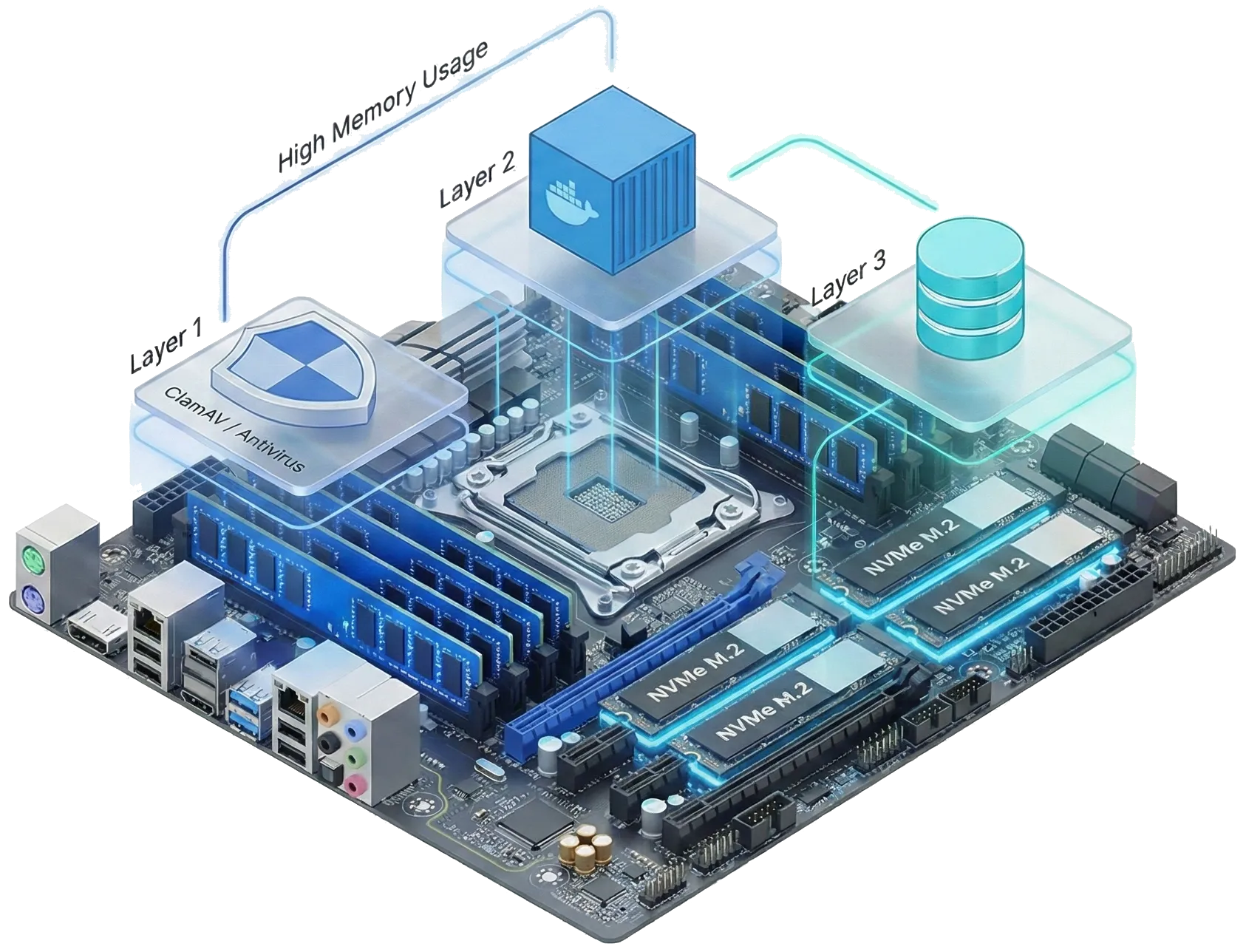
  • RAM for ClamAV & Java: Anti-virus engines (like ClamAV) and Java-based suites (like Zimbra) devour RAM. Our dedicated servers provide the massive memory headroom they require.
  • Kernel for Docker Containers: Solutions like Mailcow run inside Docker. On a dedicated server, you own the Kernel, ensuring 100% compatibility with containerization technologies.
  • NVMe for Fast Indexing: Users hate slow search bars. Our Enterprise NVMe drives ensure that searching through gigabytes of archived emails happens in milliseconds.
3D illustration of email server software stack layers connecting to dedicated hardware resources, showing ClamAV using RAM, Docker using CPU, and Database using NVMe SSDs

Three Ways to Build Your Mail Server

There is no "one size fits all." Your choice depends on your operating system (Linux vs. Windows) and how much control you want over the configuration.

Path 1: The "All-in-One" Linux Suites

Best for: Startups, Marketers & Agencies

The "Turn-Key" Solution

These are pre-packaged solutions (like Mailcow or Mail-in-a-Box). They install everything you need (SMTP, IMAP, Webmail, Anti-spam, Admin Panel) with just a few commands. They are easy to manage and perfect for getting started quickly on a Linux server.

Path 2: Windows Server Solutions

Best for: Corporate Business & Exchange Users

Native Windows Integration

If your infrastructure runs on Windows Server, you don't need to switch to Linux. Tools like SmarterMail and MailEnable offer a familiar Windows interface, seamless Outlook integration, and powerful features that rival Microsoft Exchange.

Path 3: The Manual Stack (Expert Mode)

Best for: SysAdmins & Custom Requirements

Precision Engineering

For total control, you can build your stack from scratch using Postfix (MTA) and Dovecot. This requires advanced Linux knowledge but results in a lightweight, highly secure, and perfectly optimized server with zero "bloatware."

Path 4: Enterprise Collaboration Suites

Best for: Corporate Business & Large Teams

The Complete Digital Workspace

For organizations that need full collaboration, not just email. Solutions like Zextras Carbonio or Zimbra provide Email, Docs, Drive, Chat, and Video Conferencing in one platform. These are resource-heavy Java applications that thrive on our high-RAM Dedicated Servers.

Top "All-in-One" Linux Suites

These suites bundle everything (MTA, Webmail, Antivirus) into one package. Perfect for users who want a "Gmail-like" experience on their own server.

Mailcow Logo

Mailcow (Dockerized)

The Modern Choice: A highly popular, container-based mail server suite. It comes with a beautiful UI, SOGo webmail, and robust ActiveSync support for mobile devices.

Mail-in-a-Box Logo

Mail-in-a-Box

The Simple Choice: Designed to be "easy to deploy." It turns a fresh Ubuntu server into a fully functional mail server with automatic DNS configuration and backups.

iRedMail Logo

iRedMail

The Flexible Choice: Works on almost any Linux distro (Ubuntu, Rocky, Debian). It builds a secure mail server using open-source components and offers a free web admin panel.

Zextras Carbonio / Zimbra Logo

Zextras Carbonio / Zimbra

The Enterprise Choice: The ultimate collaboration suite for large teams. It offers Email, Docs, Chat, and Video Conferencing in one platform, serving as a powerful open-source alternative to Google Workspace or Office 365.

Top Windows Server Solutions

Running a Windows Dedicated Server? These applications install natively on Windows and integrate perfectly with your existing infrastructure.

SmarterMail Logo

SmarterMail

The Exchange Alternative: A powerful enterprise-grade server with a web interface that feels exactly like Outlook. Ideal for businesses needing calendars, chats, and team collaboration.

MailEnable Logo

MailEnable

The Reliable Standard: A solid, widely-used Windows mail server. The Standard Edition is free and robust, while Enterprise versions offer advanced clustering and mobile support.

hMailServer Logo

hMailServer

The Open Source Choice: A completely free, open-source email server for Windows. It is lightweight, supports spam protection, and is perfect for simpler setups.

The Core Engines (For Experts)

If you prefer to build your own stack from scratch (using the Command Line), these are the industry-standard MTAs you will use.

Postfix Logo

Postfix

The IBM-developed MTA known for its security and speed. It is the default mail agent in many Linux distributions and powers millions of servers worldwide.

Exim Logo

Exim

The default MTA for cPanel servers. It is incredibly flexible and scriptable, allowing you to define complex routing rules for your email traffic.

You Pick the Software. We Provide the Power.

Whether you choose Mailcow, SmarterMail, or a custom Postfix stack, our Bare Metal servers give you the Clean IP and Root Access you need to build a perfect inbox.

Advanced Technical FAQ

For Dockerized suites (Mailcow), how is persistent storage handled?

Since you have full root access, you control the volume mapping. We recommend mounting your Docker volumes (/var/lib/docker/volumes) onto a separate RAID-1 NVMe partition. This ensures that even if you destroy or update the containers, your mail data (vmail), database, and DKIM keys remain persistent and safe.

Why does ClamAV consume so much RAM, and is it mandatory?

ClamAV loads its entire virus signature database into RAM for speed, which often consumes 1GB to 1.5GB of memory alone. If you are running a server with less than 8GB RAM, we recommend disabling ClamAV (using Rspamd for spam filtering instead) or upgrading your RAM. On a ServerMO dedicated server, you have the hardware resources to run it comfortably.

Can I use 'imapsync' to migrate from G-Suite or Office 365?

Yes.imapsync is the industry-standard tool for this. Since you have CLI access, you can install imapsync and run a script to pull emails via IMAP from Google/Microsoft and push them to your new Dovecot/Postfix server. We don't block any outgoing IMAP connections, so the migration speed depends entirely on the source provider's throttle limits.

Do your IPs support MTA-STS and DANE implementation?

Yes. MTA-STS (Strict Transport Security) and DANE (DNS-based Authentication of Named Entities) are DNS and SSL configurations that you manage. Our network fully supports TLSA records and HTTPS policy hosting required for these advanced security protocols to prevent downgrade attacks.

Should I configure IPv6 for my mail server?

It is optional but recommended for future-proofing. However, deliverability warning: Gmail and Outlook are extremely strict with IPv6. If you enable IPv6 in Postfix, you MUST ensure your AAAA record and PTR record (Reverse DNS) for the IPv6 address match perfectly, or your emails will bounce. We provide full IPv6 rDNS control in our panel.


Power. Performance. Precision.

99.99% Uptime Guarantee
24/7 Expert Support
Blazing-Fast NVMe SSD

Christmas Mega Sale!

Unwrap the ultimate power! Get massive holiday discounts on all Dedicated Servers. Offer ends soon grab yours before the snow melts!

London UK (15% OFF)
Tokyo Japan (10% OFF)
00Days
00Hrs
00Min
00Sec
Explore Grand Offers